The four areas
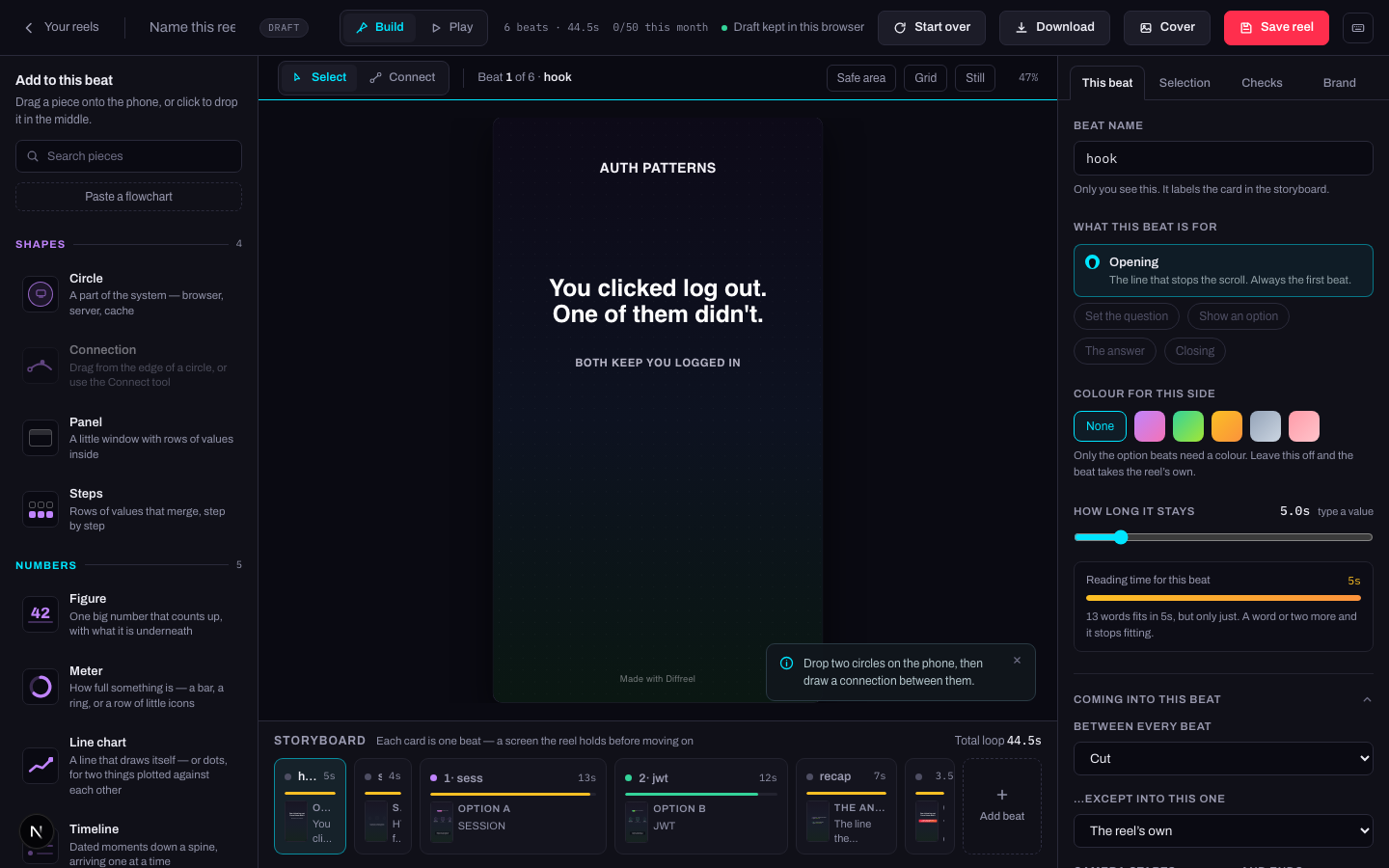
| Area | What it is for |
|---|---|
| Toolbox (left) | Every piece you can add, in four groups. Search it, or paste a flowchart into it. |
| Stage (centre) | The reel on the beat you are standing on. Drag pieces; they snap to an 8-pixel grid. |
| Storyboard (bottom) | One card per beat, in order, with its length. Click to move; drag to reorder. |
| Panel (right) | This beat · Selection · Checks · Brand · History. |
The top bar
Left to right: the way back to Your reels, the reel's name, a DRAFT badge while it is one, and the Build / Play switch.
On the right, three readouts and five buttons:
| Control | What it does |
|---|---|
| 6 beats · 44.5s | How many beats the reel has and how long the whole loop runs. |
| 2/5 this month | Reels made this month against your plan's limit. See plans. |
| Saved 09:41 | When it last reached the server. Amber means unsaved changes; on a draft it reads "Draft kept in this browser" instead. |
| N things to fix | Appears only when the checks found something. Pressing it opens the Checks tab. |
| Start over | Reopens the template picker. One ⌘Z takes it back. |
| Download | Saves the reel to your computer. |
| Cover | Saves the first frame as a PNG. |
| Save reel | Writes it to your account. ⌘S does the same. |
| ? | The keyboard shortcuts. |
The toolbar above the stage
Select and Connect are the two tools. Select moves and picks things; Connect draws a line between two circles. Esc always returns you to Select.
Beside them, Undo and Redo — which appear only once there is something to undo, and which name what they will undo when you hover them. Then which beat you are standing on, and on the right three view switches that change nothing about the reel:
| Switch | What it shows | In the finished reel? |
|---|---|---|
| Safe area | The margin a phone’s interface can cover. | No — a guide only. |
| Grid | The 8-pixel grid pieces snap to. | No — a guide only. |
| Still | Freezes the stage so you can read a beat without it animating under you. | No — the reel still animates. |
| N pinned | Appears when pieces are pinned. Pressing it lets every pinned piece be picked up again. | No — pinning is an editing convenience. |
The five panels
| Tab | What it holds |
|---|---|
| This beat | The beat you are standing on: its name, what it is for, its colour, how long it holds, how it arrives. |
| Selection | Everything about the piece you have clicked. Empty until you click one. |
| Checks | What the reel got right and what it did not, plus the five questions no tool can answer. |
| Brand | What the account has rather than what this reel holds — your mark, typeface, kit and library. |
| History | Every change you have made, named, walkable. Appears once there is something in it. |