Drafts
A reel you have not saved is a DRAFT: it lives in the browser you drew it in and on no server. The status at the top says so — Draft kept in this browser rather than a time.
Saving
Save reel or ⌘ S. The reel needs a name first — the field at the top turns red and says Needs a name if it does not have one.
The first save of a new reel
- What changes
- The draft becomes a reel on your account with a URL of its own, and the month's counter moves by one.
- Who sees it
- Only you. Reels you draw are not published, listed or shared anywhere by saving them.
- When to do it
- Once it is worth coming back to.
- Cannot be undone
- The reel stays yours and stays editable, but the month cannot be refunded — the limit counts reels made, not reels kept.
Every save after that
- What changes
- The stored reel is replaced by what is on screen. The previous version is kept in History.
- Who sees it
- Only you.
- When to do it
- Whenever. Editing is free and unlimited.
- How to undo it
- Reopen an earlier version from History, or ⌘Z before you save.
History
⌘ Z and ⌘ ⇧ Z walk one step at a time. The History tab is the same walk with names on it — “moved STORE”, “renamed beat”, “added a circle” — so you can jump to a state from twenty edits ago without pressing undo twenty times and watching.
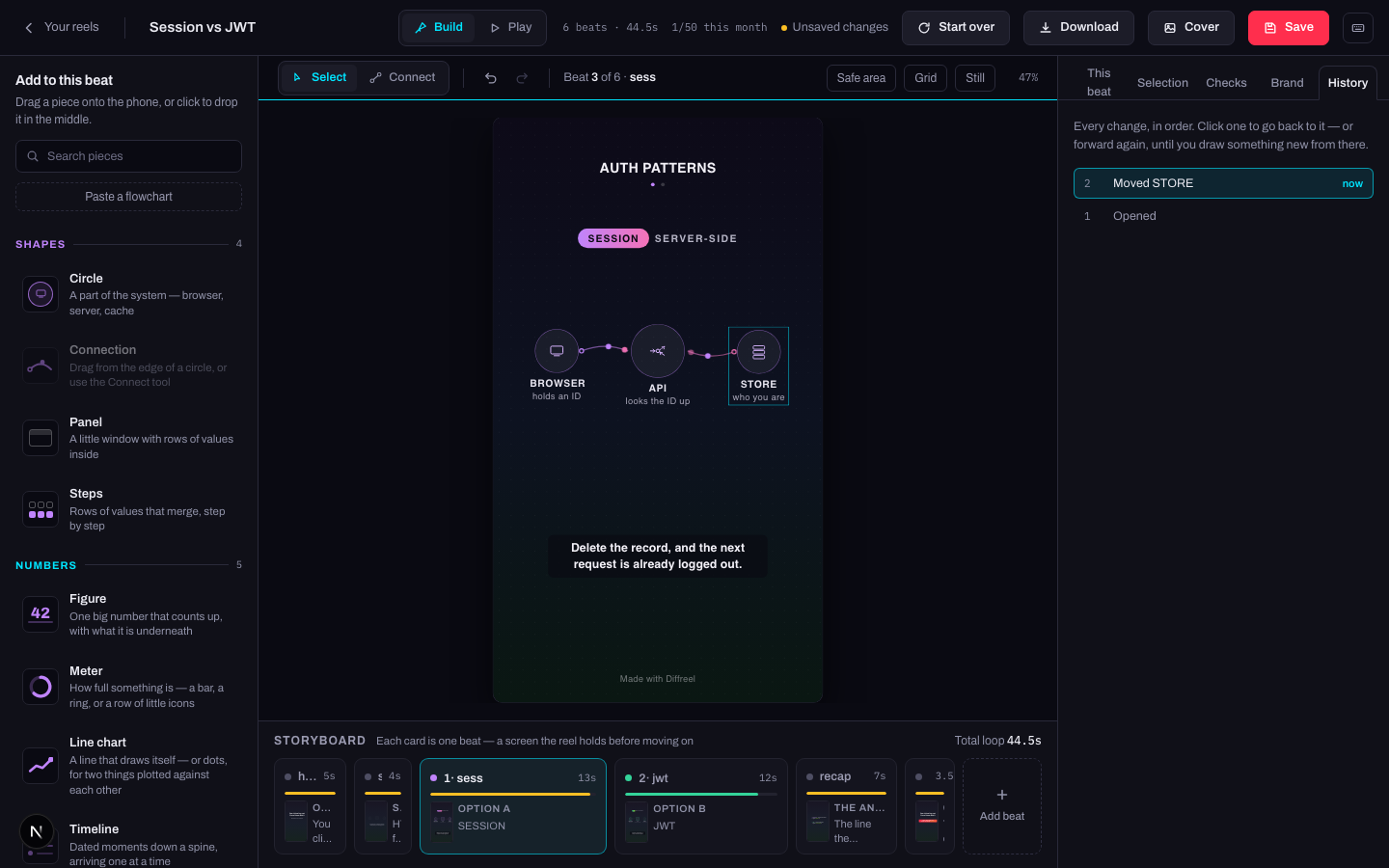
Separately, a saved reel keeps its earlier versions on the server — the last twenty, on Plus. That is the one that survives closing the tab.
Getting the reel out
| Button | What you get | What it costs |
|---|---|---|
| Download | The reel, saved to your computer. Open it and it plays — no account, nothing to install. | Nothing. |
| Cover | The first frame as a PNG — the still a feed shows before anyone presses play. | Nothing. |
Both compile the reel first, so both refuse if the document does not add up and send you to Checks with the reason.
Start over
Start over
- What changes
- Reopens the template picker. Picking a template replaces everything on the canvas; closing the dialog changes nothing.
- Who sees it
- Only you, and only until you save.
- When to do it
- The reel has gone somewhere you do not want and it is faster to restart than to unpick.
- How to undo it
- One ⌘Z. The whole replacement is a single step in History, on purpose.